
[intro] In this guide, you’ll learn how to adjust the prices of several products at once by either a monetary amount or a percentage, using the Product & Category Manager on your EKM online shop.[/intro]
1. From the Dashboard, click Products on the left-hand side: 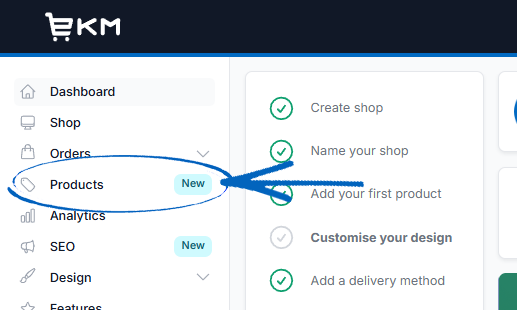
2. Using either the Category button or the Category Tree, navigate your way to the category where you would like to adjust the prices: 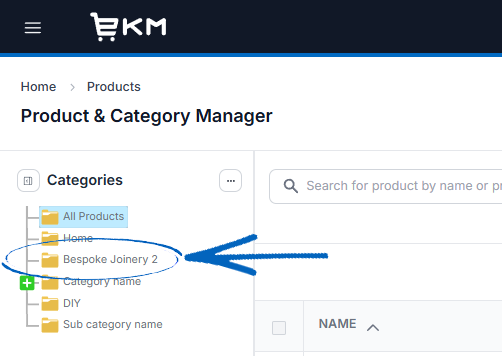
3. Now you can either tick the box in the top left-hand corner of the table to automatically tick the boxes for all products, or tick the boxes next to each product you would like to amend the price of, before clicking the Adjust Price button on the top right-hand side: 
4. In the modal that appears, you can use the drop-down menus to select whether you want to increase or decrease the prices, using either a percentage or a nominal amount, and add by how much in the field provided before clicking the green Adjust Prices button: 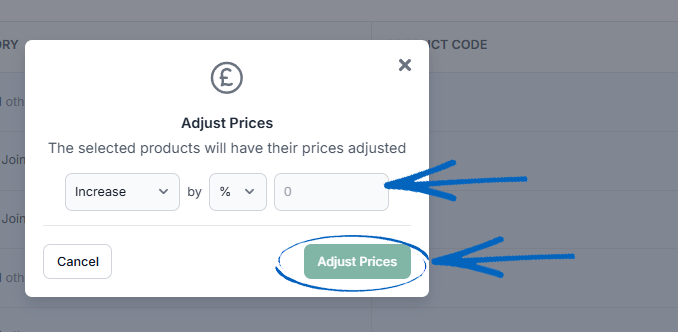
[remember]If you have a lot of products you would like to adjust the prices of, this can be done using spreadsheets and the Import/Export System feature. The Guide you need or this can be found here. [/remember]
[more]
- Product & Category Manager
- How to Adjust Stock Levels
- How to Create a Product
- How to Create Categories & Subcategories
- How to Delete Products
[/more]
[contact]If you need our help with your EKM online shop, contact your Ecommerce Expert, Account Manager, or the Customer Support Team, who can point you in the right direction. Our opening hours are 9 am - 5.30 pm Monday to Friday, for telephone calls, live chats, and emails. Outside of these hours, you can leave a message for us in the live chat window or email support@ekm.com, and we will answer as soon as possible. If you'd like to suggest a feature or an upgrade on any of the EKM platforms, please let us know on the EKM Suggestions Board. [/contact]