
[intro]Use this area of your EKM SEO account to see summaries and breakdowns of the reviews on your Google Business Profile. [/intro]
[caution] Before you begin this guide, you must ensure that you have linked your Google Business Profile to your EKM SEO account. [/caution]
1. From the dashboard, click Local and then select Reviews from the drop-down menu:
2. On this page, you’ll see a summary of the reviews on your Google Business Profile: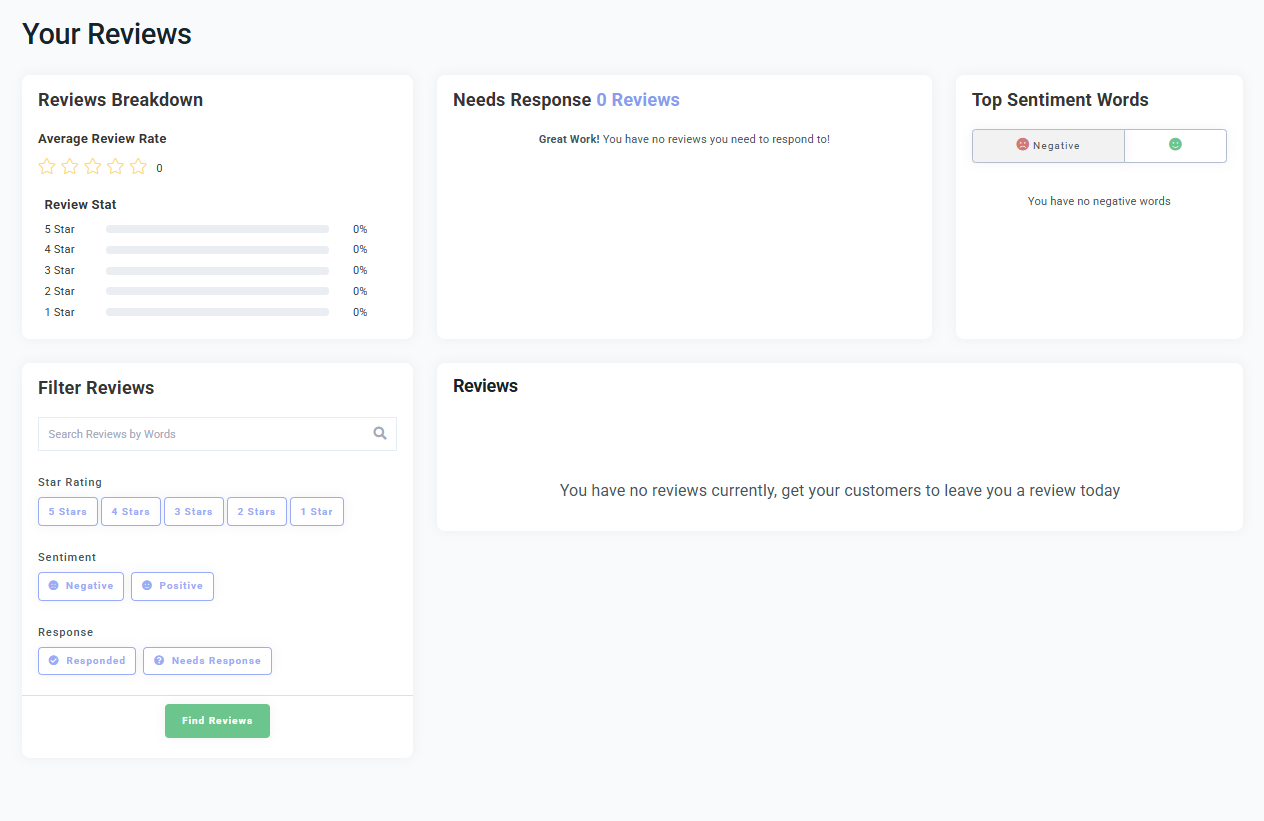
Reviews Breakdown – Here, you’ll see a summary of your reviews by star rating.
Needs Response – These are reviews that require a response from you or Seb AI.
Top Sentiment Words – You can click between the Positive and Negative tabs here to see a word map summary of words commonly used by customers in your Google Business Profile Reviews.
Filter Reviews – Using this element, you can filter existing reviews by their sentiment (positive or negative) or by their star rating.
Reviews – When you have some reviews that require a response from you or Seb AI, you’ll see them displayed here.
Frequently asked Questions
What are Review Responses?
When someone leaves you a review on your Google Business Profile, Seb AI will:
- Email you to let you know.
- Suggest a response for positive reviews.
If you don’t like the suggested response, you can click Make Changes in the Approval Centre to modify the response directly within the EKM SEO platform.
Why am I being prompted to add my own review response?
You’ll be asked to write your own response if:
- You reject Seb AI’s suggested reply, or
- The review is negative (since Seb AI won’t suggest a reply for negative feedback). Negative reviews won’t have a suggested response because we believe these should be personal to your business. Since Seb AI doesn’t know the full story behind each customer review, it’s important that you create a response that feels right for you. We want to make sure your responses are genuine and reflect your business’s voice.
How can I create my own review response?
When you click Give Feedback to a suggested response, you’ll be given space to write your own reply. Keep it simple, polite, and professional - even if the review is negative.
[more]
[/more]
[contact]If you need our help with your EKM online shop, contact the Customer Support Team, who can point you in the right direction. Our opening hours are 9 am - 5.30 pm Monday to Friday, for telephone calls, live chats, and emails. Outside of these hours, you can leave a message for us in the live chat window or email support@ekm.com, and we will answer as soon as possible. If you'd like to suggest a feature or an upgrade on any of the EKM platforms, please let us know on the EKM Suggestions Board. [/contact]