
[intro]Use the Rankings page to add local keywords to your SEO strategy and increase the visibility of your Google Business Profile, and in turn, your EKM online shop. [/intro]
Local SEO keywords help businesses attract customers within their service area or target market and can effectively drive local traffic and generate leads or sales. The benefits of using local SEO keywords include:
Increased Visibility
Using local SEO keywords makes your EKM online shop or content more likely to rank higher in search engine results for users within your target area. This increased visibility can help your business get noticed by potential customers in your community.
Targeted Traffic
Local SEO keywords attract users who are actively searching for products or services within a specific geographic area. This targeted traffic often has a higher intent to purchase or engage with a local business, resulting in better conversion rates.
Increased Customer Engagement
When your EKM online shop or content is optimised with local SEO keywords, it becomes more relevant to local users, which can lead to higher engagement, more positive reviews, and repeat business.
Competitive Advantage
By focusing on local SEO keywords, your business can gain an advantage over competitors who may not be optimising their content for local searches. This can help your business stand out and capture a larger local market share.
Cost-Effective Marketing
Local SEO is often more cost-effective than traditional advertising methods, as it targets users who are already searching for your products or services within a specific area. This means you're reaching potential customers with a high likelihood of conversion, maximising your return on investment.
Builds Local Reputation and Trust
Optimising your content for local SEO keywords can help establish your business as an authority in your area, building trust with local customers and improving your reputation within the community.
Locating the Page
1. From the dashboard, click the Local tab, and then Rankings from the drop-down menu:
2. You’ll then see this page, where you can edit your Local Keywords. First, you need to click the drop-down menu to select your location: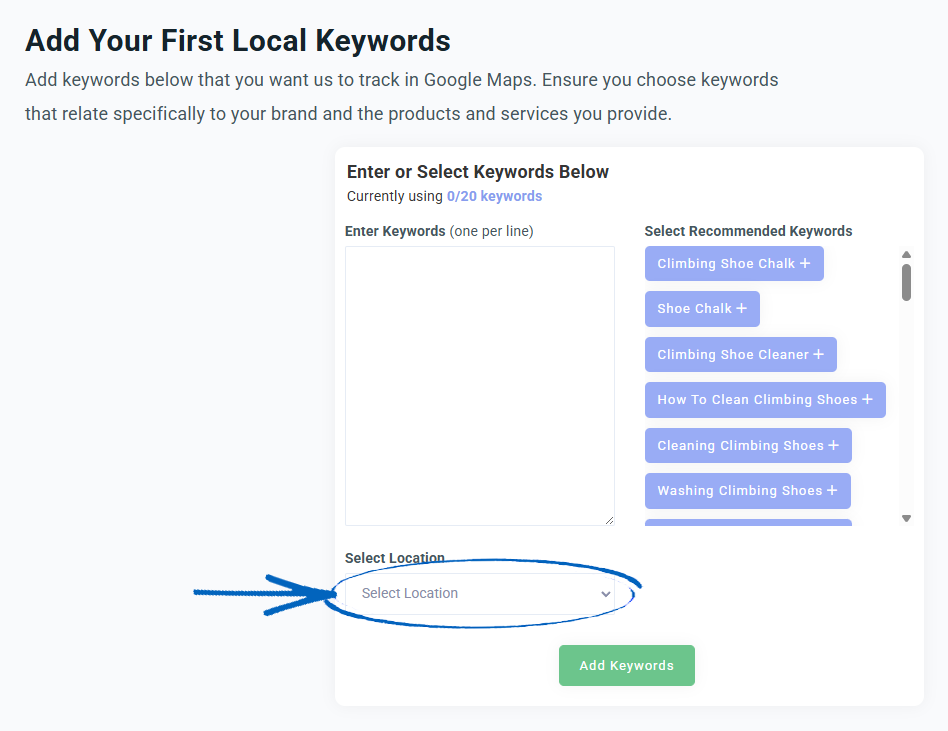
[remember]
How many local keywords should I try to rank for on my Google Business Profile?
Optimising for local keywords that suit your target area can significantly help your EKM online shop's SEO or how well you appear in online searches.
When people around your target area search online, they usually want to find businesses nearby. Google helps with this by checking websites to see where they are targeting. So, putting local keywords in your metadata and copy helps Google know where you are targeting. This can make your EKM online shop appear higher in search results when people search for these keywords.
We recommend targeting around 10-15 keywords for your Google Business Profile, specifically focusing on umbrella-term keywords that describe your business, as well as key service page keywords.[/remember]
3. You’ll then see a secondary location menu appear, where you need to repeat the process: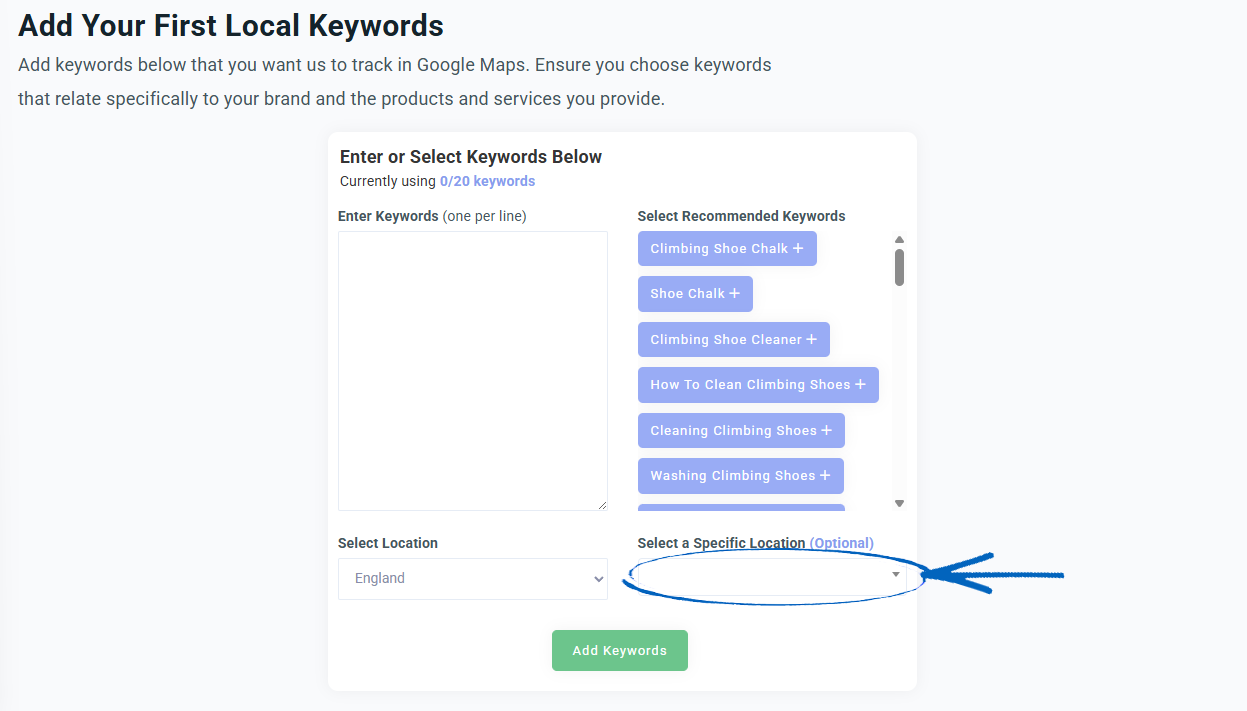
My EKM Online Shop has a Physical Location
If your EKM online shop has a physical location, like a store or showroom, it’s essential that you use local keywords to really define your products and your brand by undertaking some research:
List Your Business Solutions
In this step, you want to come up with a list of all the products or services that your business offers, along with what your business is about.
For example, if your business is a bicycle shop:
- Bicycle shop
- Bicycle repairs
- Mountain bikes
- Bicycle accessories
- Bicycle helmets
- Bicycle gloves
- Bicycle rentals
Add Keyword Modifiers
Next, you want to modify your phrases with keyword modifiers that fall into the following categories:
- Quality: Best, Top
- Price: Cheap, Cheapest, Lowest Price
- Occasion: Winter/Spring/Summer/Autumn, Birthday/Wedding/etc, Easter/Christmas/etc
- Type: [A Product or Service your Business Offers]
- Features: Same-Day Shipping, All-Inclusive, Gluten Free, etc.
- Intent: Buy, Order, Reserve
Add Location Modifiers
The next step is to add location modifiers that explicitly mention a landmark, street, postcode, neighbourhood, town, city, county, or area, for example:
- Greater London
- London
- SW1A
- North/East/West/South London
- City Centre London
- Leicester Square
- Big Ben, London Eye, etc
- Westminster
- Baker Street
Modifier + Keyword + Location Combinations
Based on the previous steps, you can now generate a large list of keyword phrases based on the modifiers, business keywords, and locations. You can also leave out modifiers or places if you want a broader term. Here are some examples:
Explicit:
- Top bicycle repair London
- Bicycle shops Baker Street
Implicit:
- Cheap bicycle rentals
- Best bicycle repairs
You should now have a list of keywords that you can start using for your local SEO strategy.
[tips] Don't forget to add these local keywords to Keyword Research to view their keyword difficulty and search volume. [/tips]
4. Then you need to add in Local keywords. You can do this by clicking the Recommended Keywords on the right-hand side, or by typing your keywords directly into the Enter Keywords field. When you have finished adding your keywords, click the green Add Keywords button: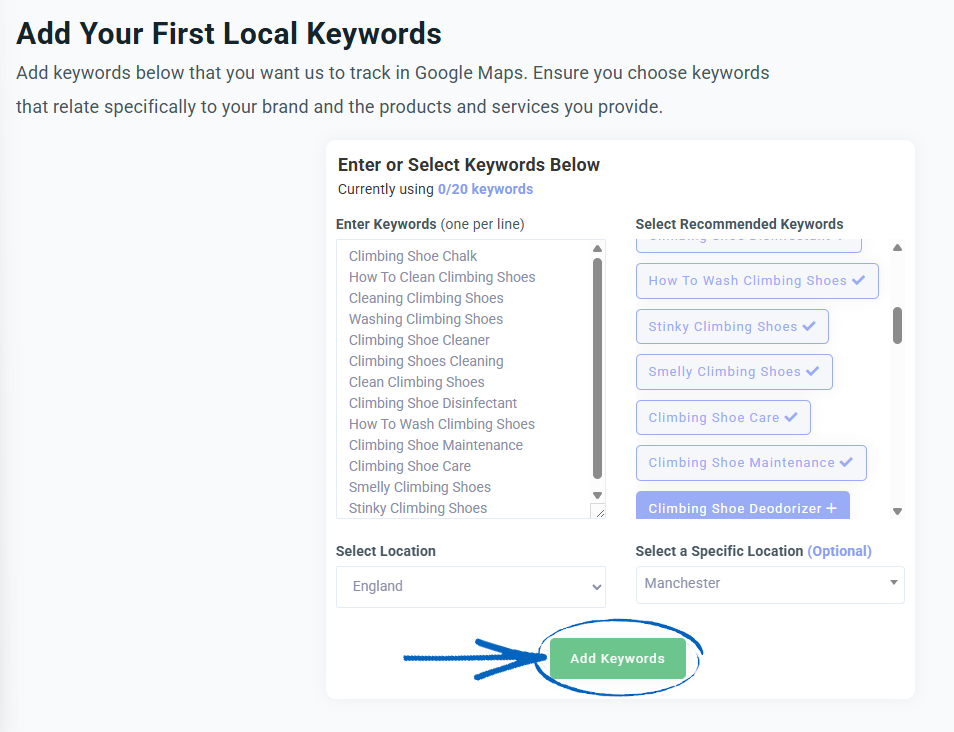
5. When you’ve added your local keywords, the page will update. In the top right-hand corner, you can click to Add or Delete keywords from your list. You can also click Export to see this data in a PDF: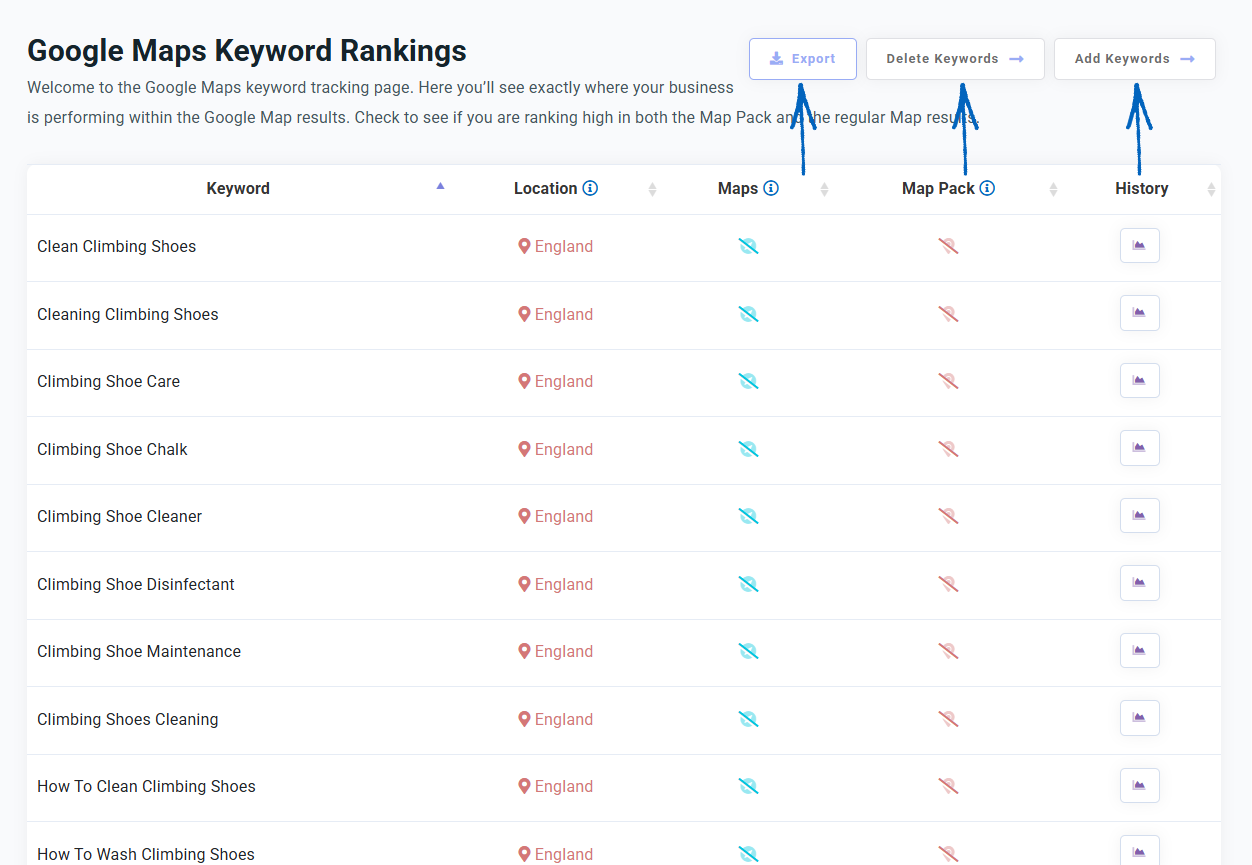
6. The graph below displays each of your local keywords.
- Location Search – EKM SEO replicates a non-personalised Google search (no search history) from the very centre of the location you set. This is why it is important to choose a location as specific as possible, and why the results you see may differ slightly from what is reported.
- Maps – These results refer to the listings shown directly within Google Maps, often found by clicking the Maps tab in Google or simply searching directly within the Google Maps app. Results here can differ from the Google Map Pack.
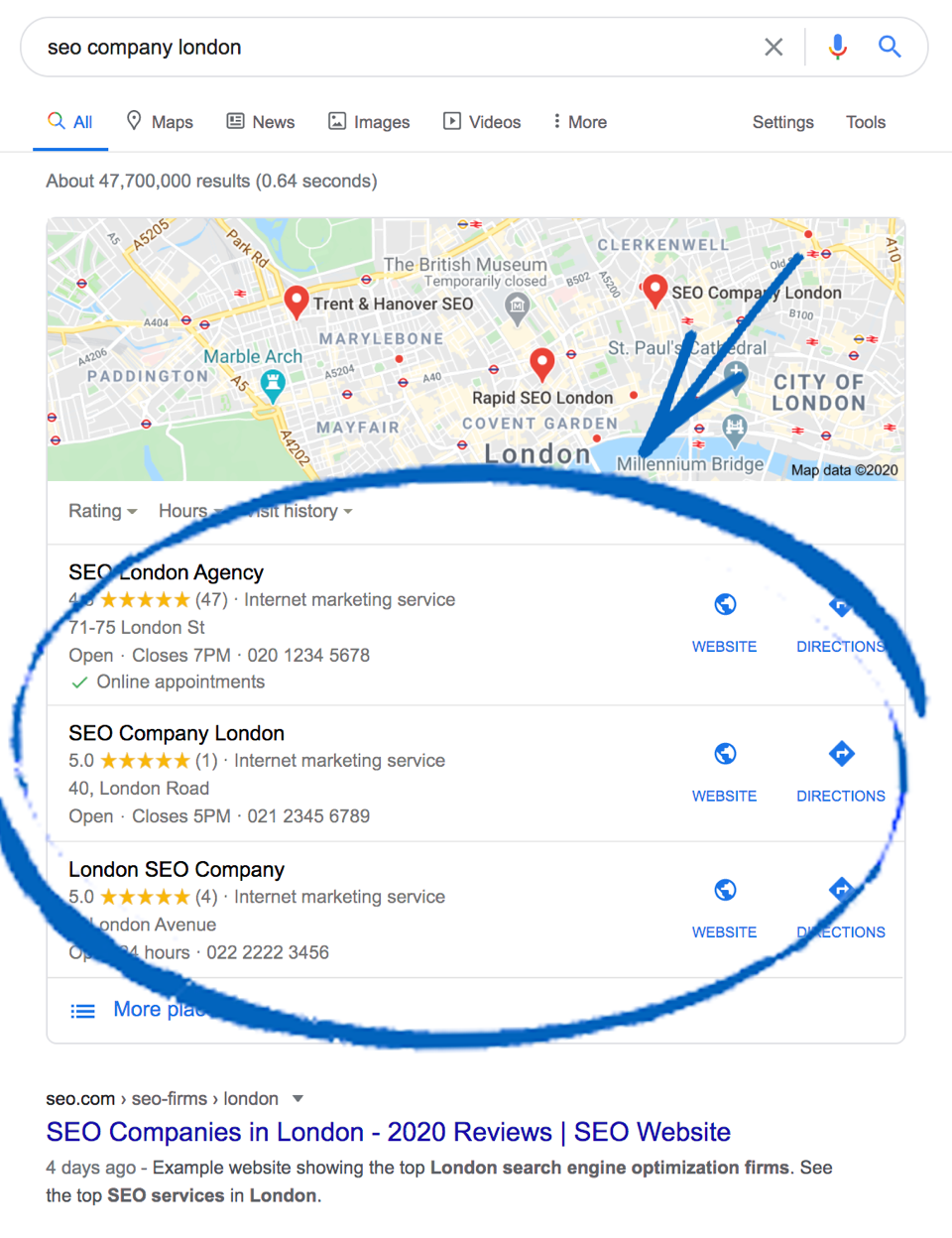
- Map Pack- The Google Map Pack (also known as Local Pack or ‘3 Pack’) is the set of 3 Google Map results placed towards the top of the regular Google organic search results:
- History – Click this button for each keyword to see a breakdown of the traffic for that keyword in your chosen location.
You then need to monitor this page on a regular basis, ensuring that you’re using the most popular local keywords for your location.
Frequently Asked Questions
Should I optimise for ‘near me’ keywords?
‘Near Me’ searches are typically used by people who are looking for venues, services, or events in a specific area. It's a great idea to try to optimise for these keywords, as it can attract customers interested in your services who are also in your area.
How do I Optimise for ‘Near Me’ Keywords?
Don’t add ‘near me’ keywords!
Although it may sound counterintuitive, one common mistake people make is adding ‘near me’ keywords into Keyword Research and Keyword Sitemap. You want to add keywords to headings, titles, and page content. You’ll find it’s very difficult to add ‘near me’ keywords naturally here, and it could negatively affect the quality of your content. Instead, you can optimise for 'near me' keywords in other ways:
There's no need to optimise the phrase 'near me' in a keyword. Despite its frequent usage in searches, there are more effective approaches for optimisation.
Google takes the 'near me' component from a user's search and pairs it with businesses and websites it deems are the most geographically closest and relevant to the user. So instead of 'Emergency plumber near me,' you would have 'Emergency plumber in London,' for example.
Therefore, for local businesses aiming for local rankings, including your specific target location within your keywords and tailoring your SEO strategy around them is advisable. In doing so, Google will understand the business's location and can recommend it to users who are searching for services 'near me.'
What are Google Map Pack rankings?
Google Map Pack is a feature that appears in Google search results when users search for local businesses or services. It displays a series of business listings that are relevant to the search query, along with their location on a map. Map Pack is designed to help users find local businesses quickly and easily without browsing multiple web pages. This is a different feature from Google Maps, which is a web-based mapping service that allows users to view maps, obtain driving directions, and search for points of interest.
One of the key differences between the two is that Google Maps is a standalone application, while Map Pack is integrated into Google search results. While Google Maps allows users to search for businesses, it provides a different level of detailed information than Map Pack. Map Pack listings include business hours, reviews, photos, and more.
The Map Pack reflects the top three searches. For example, if you searched 'hair salon, London', the top three results shown are the Map Pack results. The Map Pack ranking results can vary from the Google Map rankings, which will show a selection of the closest results, whereas Map Pack will show the top three ranking results.
The best way to improve your Google Maps and Google Map pack rankings is to work through your Local Actions.
Why am I ranking for Google Maps and not Map Pack?
When it comes to increasing visibility on online searches, Google Maps and Map Pack are two of the most important factors for success. While both work in different ways to improve your ranking on Google search results, understanding the difference between them is key to creating a successful search engine optimisation (SEO) strategy.
How do I Rank for Both?
Google Maps and Map Pack are two distinct entities, and if you want to be successful in both, you will need to focus on different aspects for each. To rank for Google Maps, you need to focus on local SEO, including optimising your EKM online shop with local keywords, building local links and setting up a Google My Business page. To rank highly for Map Pack, you will need to focus on quality reviews and a complete Google My Business page.
Google Maps and Map Pack are two of the most important factors for improving your ranking on Google search results. Google Maps is a mapping platform that allows people to search and review places, while Map Pack is a feature of Google Search that shows up in the search results. To rank highly for both, you will need to focus on different aspects, such as local SEO for Google Maps, quality reviews and a complete Google My Business page for Map Pack.
[more]
[/more]
[contact]If you need our help with your EKM online shop, contact the Customer Support Team, who can point you in the right direction. Our opening hours are 9 am - 5.30 pm Monday to Friday, for telephone calls, live chats, and emails. Outside of these hours, you can leave a message for us in the live chat window or email support@ekm.com, and we will answer as soon as possible. If you'd like to suggest a feature or an upgrade on any of the EKM platforms, please let us know on the EKM Suggestions Board. [/contact]