
[intro] The Keyword Tracker page in your EKM SEO account allows you to look at the keywords associated with your EKM online shop in greater detail. [/intro]
[summary]
- Avg Ranking
- Competition
- Keyword Scan
- How to Delete Keywords
- How to Export Keywords
- Frequently Asked Questions
[/summary]
Locating the Page
From the dashboard, click Reporting and then click Keyword Tracker from the drop-down menu:
The Keyword Tracker page allows you to look at the keywords associated with your EKM online shop in greater detail. The keyword is listed on the left-hand side, and the URL is displayed next to it. In the case of a /, this means the homepage of your EKM online shop.
Next to this, you’ll notice the keyword positions divided into Current, Last Week and Last Month.
[remember]
What does 100+ in the Current column mean?
When you've finished your onboarding strategy, the platform then keeps track of where your EKM online shop ranks in Google search results. If you've just opened your EKM SEO account or if you've just added a new keyword, you might see that the platform reports '100+' as your keyword position.
What does this mean? EKM SEO will only check the top 10 pages of Google for your EKM online shop, and if it can’t be found in the top ten pages, then you’ll see '100+'. You also won't see a ranking URL next to it, as it's not yet ranking for a page in the top 10 pages. All you need to do is continue optimising that keyword for the page you would like it to rank for. [/remember]
1. Search Vol is a rating indicating an approximate number of searches made for each keyword: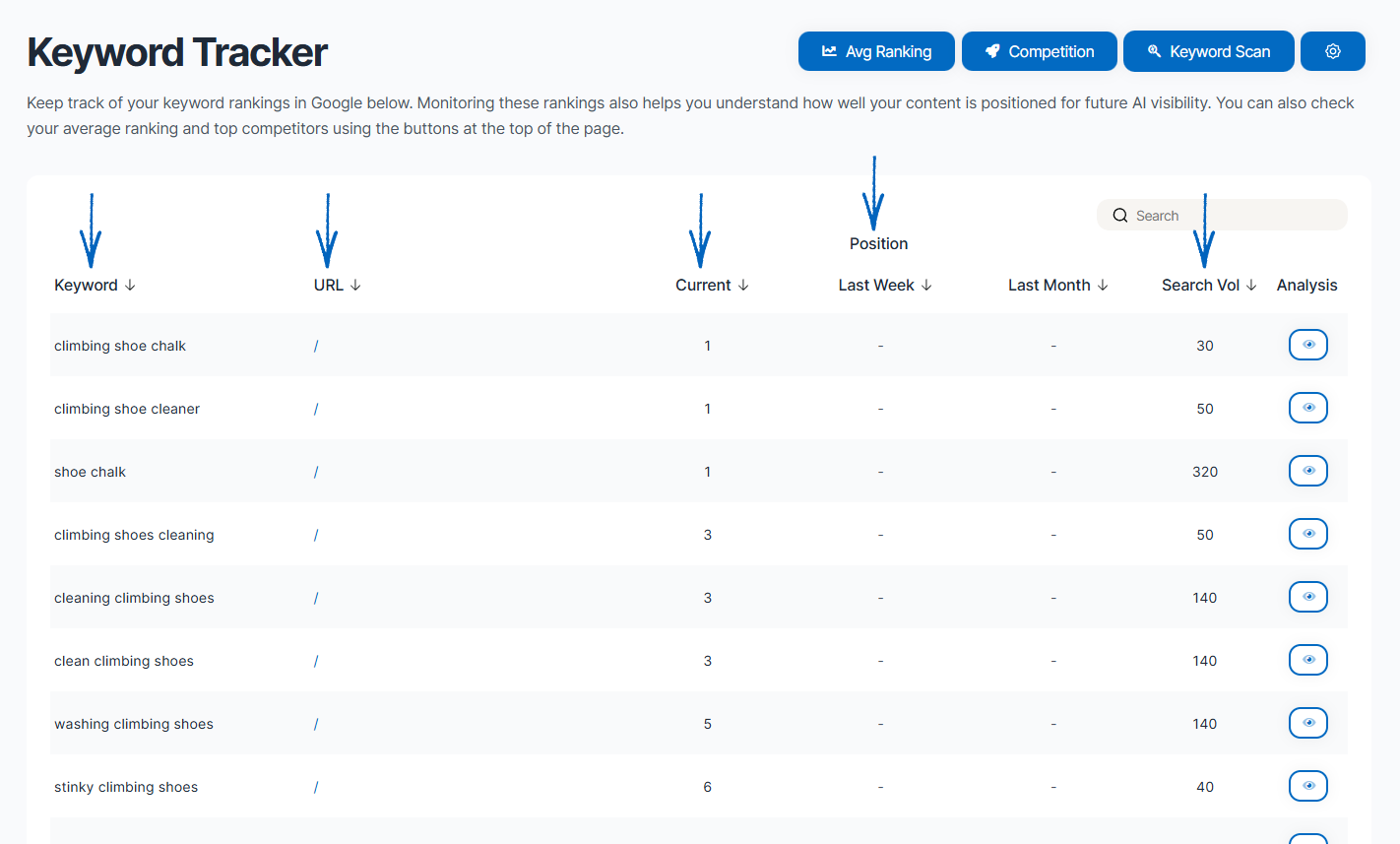
[remember] What does search volume mean?
Search volume is a metric provided by Google. It specifies the average number of people who search on Google for a given 'keyword' every month. So, let's say 'SEO' had a search volume of 100,000. This means that (on average) 100,000 people search the term 'SEO' in Google every month. The important word above is 'average'. What Google does is take the yearly figure and then divide it by 12 to get the monthly number. These figures don’t reflect seasonal trends, so be mindful of that (e.g. some months may have way more people searching that term than others, but Google only shows an average over the whole year).
Higher search volumes can bring more traffic to your EKM online shop, but these keywords can also be highly competitive. Lower search volumes can indicate niche products, so although they won’t deliver high amounts of traffic, the visitors, because of those search terms, will find exactly what they’re looking for. [/remember]
2. Click the eye symbol in the Analysis column:
3. This will redirect you to a page where you can view the historical ranking of that specific keyword and the top ten results for that keyword, as listed in Google search results: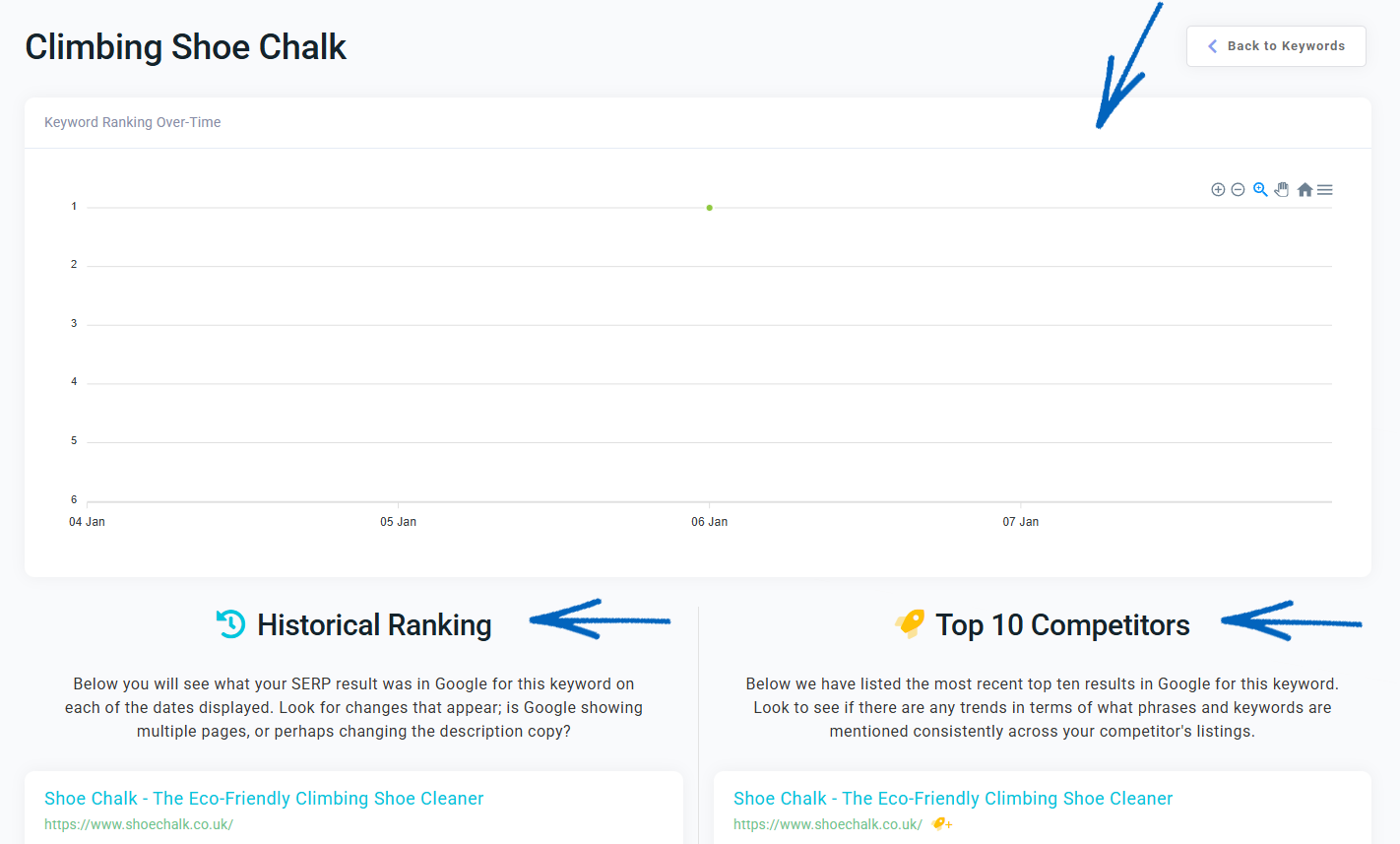
4. Returning to the Keyword Tracker page, you’ll notice three buttons in the top right-hand corner:
Avg Ranking
5. Clicking the Avg Ranking button reveals this modal, where you can see the average ranking over time of your keywords. After a few months, when more data has been gathered, you can use the buttons in the top right-hand corner to zoom in and out of this graphic for further analysis. Clicking ‘Show Algorithm Updates’ will detail where Google has made changes which can influence your average ranking. You can click the three horizontal bars in the top right-hand corner to export this data too: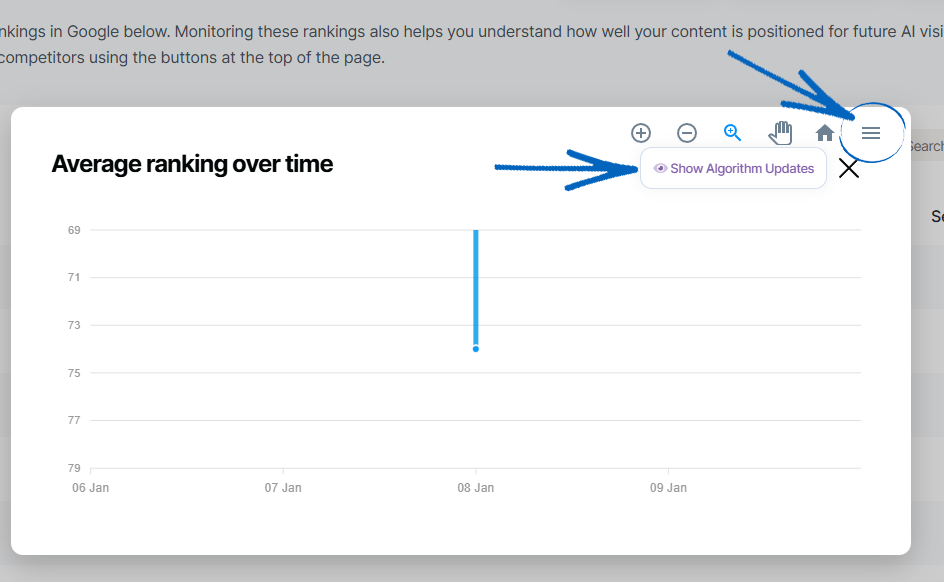
Competition
6. Click this button to reveal a modal which displays which other websites online have the same keywords listed for comparison: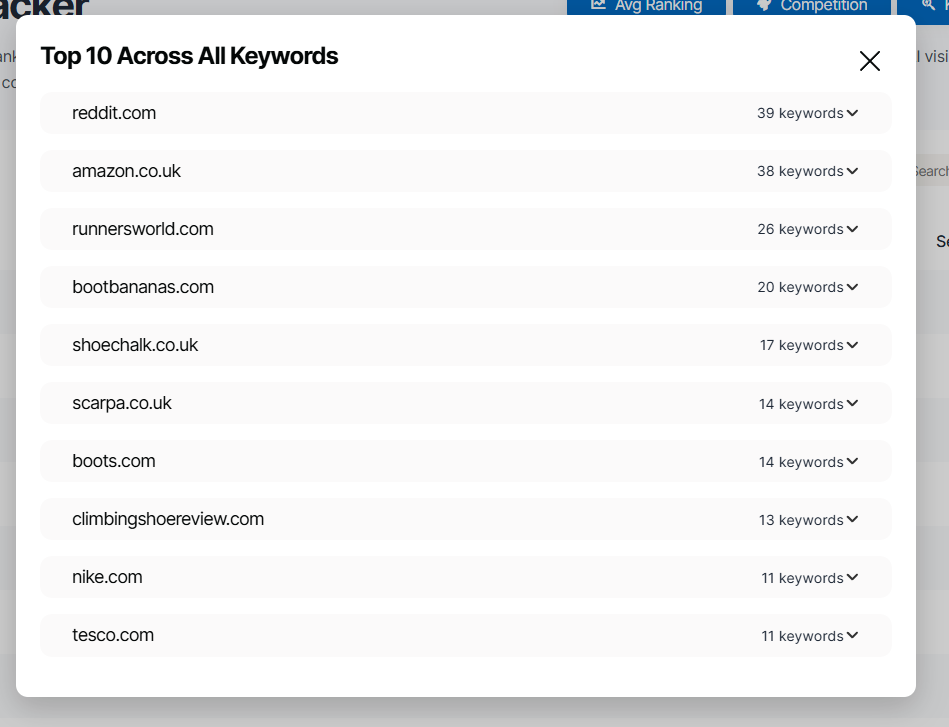
Keyword Scan
7. If you click Keyword Scan, you’ll be redirected to this page. When you first open your EKM SEO account, this will be quite empty, but over the months, you’ll see this area populated with more data, which can be exported to a spreadsheet if required. Updating every 90 days, this page will display keywords that you have not yet added to your own SEO strategy. Check this area monthly to track progress: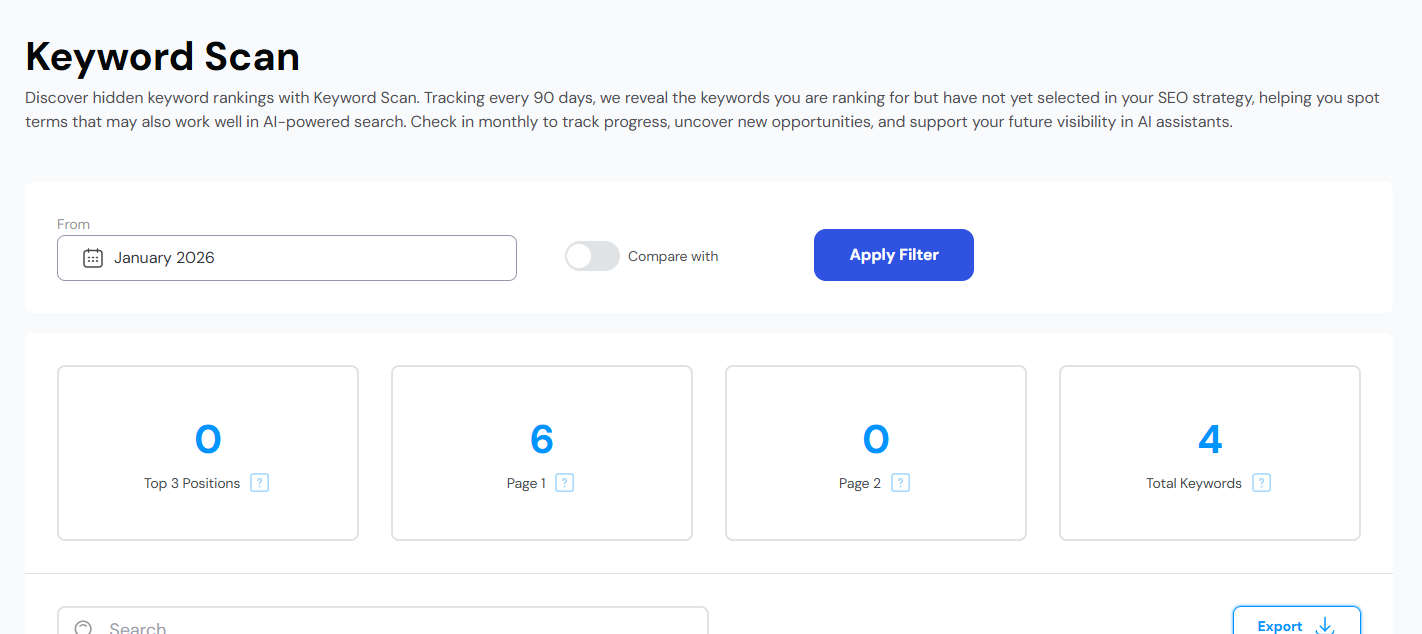
8. Scroll further down this page to see these keywords. Again, you’ll see keywords listed with their position and search volume. To add a keyword to your SEO strategy, click the key symbol on the right-hand side: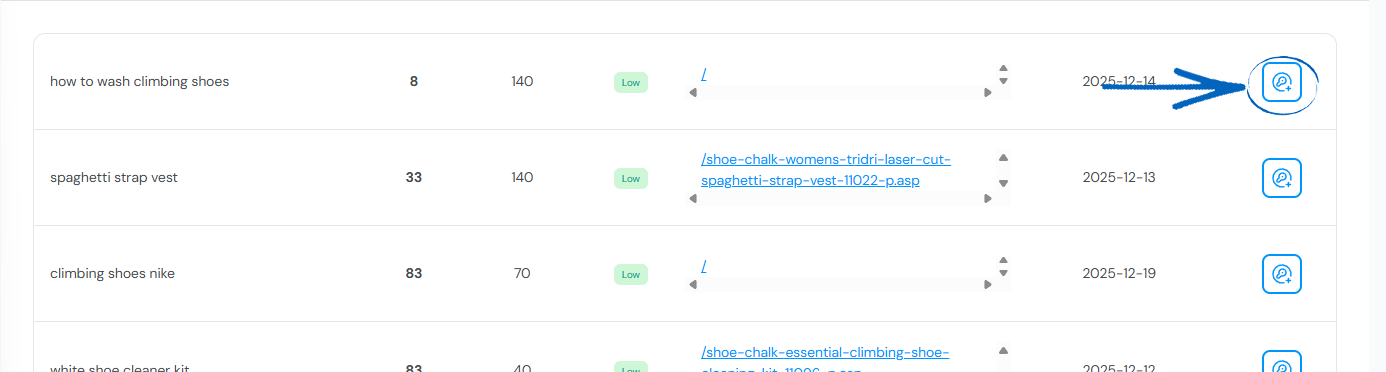
How to Delete Keywords
1. Scroll to the top of the page, and click the cog symbol in the top right-hand corner:
2. Select Manage from the drop-down options: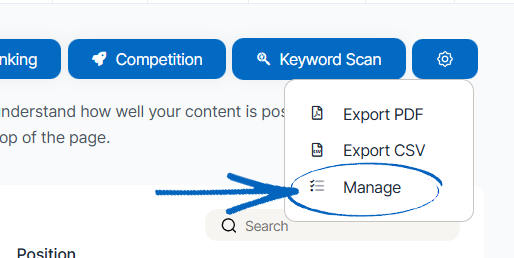
3. You’ll then see this page, where you can click the dustbin symbol next to each of the keywords that you’d like to delete from your current SEO strategy: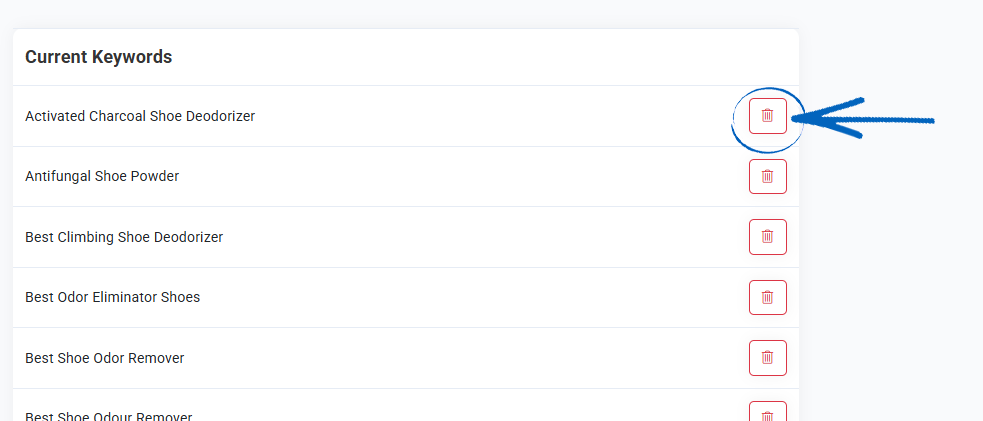
4. For each keyword you remove, you’ll see this modal. Simply click the button on the left-hand side to remove the keyword and reload the page: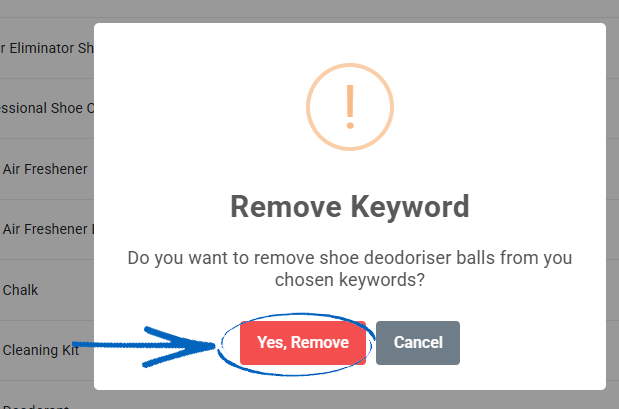
How to Export Keywords
1. Scroll to the top of the page, and click the cog symbol in the top right-hand corner:
2. Select either Export PDF or Export CSV to export your Keyword Tracker data: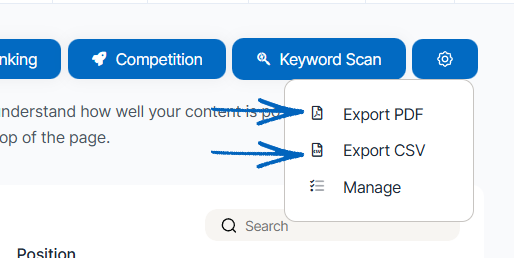
Frequently Asked Questions
How long does it take to rank for my keywords?
When you first start with SEO, it's important to know that SEO results take time! Google has built its algorithm to promote websites that have built a level of 'authority' over time. Google does not want to promote websites that have not proved that they are worthy of their customer's traffic. Some of the factors that determine 'authority' are:
- Age of the website
- The quality of the content
- The quality/quantity of backlinks pointing to that website
- The quality of the website itself (technically speaking)
- Other signals (citations, social channels, reviews, etc)
These build up over time, so that's why SEO results take time. But how long will it take to rank? That depends on three things:
1. How quickly you build authority based on the above - the quicker the better, but strong authority comes with time.
2. Avoiding doing anything that Google doesn't like, such as keyword stuffing, for example.
3. The competitiveness of the SEO market you're targeting. This means how many other websites are actively SEOing for the terms you want to rank for. There's a general rule of thumb to play by here:
The more people search for a keyword => the more SEO competitive that keyword will be => the longer it will take to rank/the more authority you need to build for your website.
For this same reason, it’s always a good idea for small businesses to write regular blog posts using the EKM Blogs XXXXXXX feature. Blogs typically target less competitive keywords, targeting users who are looking for a specific question or a very niche service or information.
There are, however, some general timescales for SEO:
- If you write a good blog, you can expect to start driving traffic to that blog within 1-2 months
- If you optimise a product/service/homepage with a keyword that is low in competitiveness for your website*, then you can expect to rank within 3-6 months
- If you optimise a product/service/homepage with a keyword that is medium in competitiveness for your website*, then you can expect to rank within 6-12 months
- If you optimise a product/service/homepage with a keyword that is high in competitiveness for your website*, then you can expect to rank within 12+ months
To make it super clear, the above are all based on previous experience/general SEO timescales, but are dependent upon the quality and amount of SEO you do. It also depends on the quantity and level of SEO completed previously. They are not guaranteed timescales, especially if you are not completing all the SEO actions that the EKM SEO platform provides.
*Use our difficulty metric to judge competitiveness for a keyword for your website. The higher the bar, the lower the competitiveness of that keyword for your website.
How often are keyword rankings updated?
The EKM SEO platform will check your keyword rankings weekly. It will report on your exact position within the first ten pages of Google search results within the country you selected when you first set up your account.
How and where are my keywords being tracked?
The EKM SEO platform tracks your keywords and keyword rankings within the Google search engine, where your primary customers are based. This is because Google is the primary search engine used in the world. For example, if your customers are primarily British-based, then we will search for your keyword rankings in Google UK. If you choose the US then it will search within Google US, and so on.
How frequently should you check your keywords?
If you've built your SEO strategy already and started to optimise your website, then you'll likely be checking your keyword rankings frequently to see the impact of the work you've done. This can become quite addictive and be really enticing to check your rankings every day or even more. However, this is not recommended for two reasons:
1. Rankings fluctuate all the time! Google is constantly tinkering with its algorithm, and as a result, websites move multiple times a day. You can't spot trends during a day, or even 2.
2. It's a waste of your precious time! Checking every day or more isn't productive.
Due to Google's fluctuations, we recommend you check your keywords monthly. This way, you can easily spot trends over time that will really tell you how your SEO strategy is going.
How often do keyword rankings move?
You might be seeing that your keyword rankings fluctuate a lot. Maybe one day you rank in one position, and then the next time it's moved. First off - don't worry about this movement! It is completely natural, as Google are frequently updating their algorithms. The rate of fluctuation will vary dependent upon where the keyword is ranking. It breaks down into two groups:
1. If your keyword is ranking on page 4 or more = then the fluctuations will be a lot more extreme. You can move from page 5 to page 8, back to page 6, and then to page 9, and so on. This is normal behaviour past page 4 onwards.
2. If your keyword is ranking on page 4 or less = you will see a lot fewer extreme fluctuations (e.g. it should not jump 2+ pages back and forth), but you can see it move up to half a page at a time. Again, this is normal for almost every kind of website.
Why are my keyword rankings on EKM SEO different to other tools?
When using the EKM SEO platform, you may occasionally notice that the keyword rankings displayed differ slightly (or even significantly) from the rankings displayed in other SEO tools. Don't panic! Here's a brief explanation of why this happens:
1. Different Data Centres - Search engines, like Google, have numerous data centres located around the world. The results they display can slightly vary between these centres. If two tools are accessing different data centres for their ranking data, the results may not align perfectly.
2. Local vs. National Search - Rankings can vary significantly between local and national searches. Some tools might show you the ranking of a keyword on a national scale, while others might focus on local search results, or vice versa. When you add your EKM online shop to the platform, you can select if you want to track keyword rankings at either a local or national basis.
3. Update Frequency - Different SEO tools have varying frequencies for updating their ranking data. EKM SEO will check your keyword rankings in Google weekly. This frequency difference between tools can account for discrepancies in rankings.
4. Personalisation - Search engines tailor results based on user behaviour, search history, device, and other personal factors. SEO tools like EKM SEO can't 100% accurately simulate every user’s search. Different tools have different ways of replicating this, which will account for discrepancies in rankings.
5. Mobile vs. Desktop Rankings - Results can differ between mobile and desktop searches due to factors like mobile-friendliness, site speed, and device optimisation. The EKM SEO rankings are based on Google's mobile results, whereas some other tools might show rankings from desktop searches.
6. Exact Match vs. Variations - Some tools - like EKM SEO - check the exact keyword ranking, meaning it checks Google for the keyword exactly as you selected. However, some other tools also consider slight variations of the keyword as well and provide an average ranking score.
Ranking discrepancies between SEO tools are completely normal due to the myriad variables and methods at play. While these differences can be confusing, it's essential to remember that no tool can provide 100% accurate, real-time ranking data. Instead of focusing solely on the rank of a keyword, consider the overall trend and use the insights to improve your SEO strategy.
Why is keyword search volume different to other SEO tools?
You may have noticed some discrepancies if you've been comparing keyword search volumes between the EKM SEO platform and other SEO tools. Here's a clear explanation of why these differences exist:
1. Google Keyword Planner
EKM SEO platform relies solely on the Google Keyword Planner for search volume data. Google itself provides this tool, and it's designed to offer insights for advertisers on the Google Ads platform. Given this, the data reflects the volumes directly from the source.
2. Clickstream Data Absence
Some SEO tools supplement their keyword volume data with clickstream data. Clickstream data comes from third-party companies and captures user browsing behaviour. Some tools aim to offer a more comprehensive view of search volumes by combining Google Keyword Planner data with clickstream information.
However, this method has its pros and cons. While clickstream data can provide added granularity and capture long-tail keywords that might not appear in the Google Keyword Planner, its accuracy varies and often depends on the size and quality of the sample. Plus, there is often significant debate over the legality of collecting large-volume clickstream data.
EKM SEO relies on Google's data without mixing in clickstream information to ensure consistency and clarity in the figures we present.
3. Update Frequency
Different tools have varying schedules for updating their keyword data. This means even if two tools are both using Google Keyword Planner, they might still show slightly different volumes if they've last updated their data at different times.
Can I change my keywords?
When you first open your EKM SEO account, you'll build your first keyword strategy and assign these keywords to the current (or as-of-yet not created) pages on your EKM online shop. To update those keywords, you need to visit the Keyword Research page. There, you can change your keywords, as you did during the onboarding process.
Why have my keyword rankings dropped?
Keyword rankings can drop for several reasons, and it’s often due to a combination of factors rather than one single issue. Google uses hundreds of signals when ranking websites, so changes are normal from time to time.
Common causes include:
- Google algorithm updates, which can affect visibility across many sites.
- Keyword optimisation changes, where keywords have been removed or are no longer on the correct pages.
- Keyword cannibalisation, where multiple pages compete for the same keyword.
- Lost backlinks, especially high-quality links.
- Increased competition, where competitors have improved their SEO strategies.
To investigate, start with the Keyword Rankings tool to see which keywords have dropped and check the Actions section for guidance on what to improve. Keeping your content fresh, correctly optimised, and supported by strong backlinks will help stabilise and improve rankings over time.
[more]
[/more]
[contact]If you need our help with your EKM online shop, contact the Customer Support Team, who can point you in the right direction. Our opening hours are 9 am - 5.30 pm Monday to Friday, for telephone calls, live chats, and emails. Outside of these hours, you can leave a message for us in the live chat window or email support@ekm.com, and we will answer as soon as possible. If you'd like to suggest a feature or an upgrade on any of the EKM platforms, please let us know on the EKM Suggestions Board. [/contact]